
A student walks into class with a screenshot. It looks like a private message thread, complete with timestamps, typing bubbles, and the familiar rhythm of a chat argument escalating in real time. “This is what she sent me,” the student says. Everyone leans in.
For teachers, that moment is both ordinary and complicated. Screenshots have become a kind of social currency. They’re used to prove a point, start a fight, end a friendship, report harm, or, occasionally, do the right thing. But they’re also easy to fake, and the tools keep getting smoother. Digital literacy can’t stay stuck on “don’t believe everything you read online.” It has to reach the point where students can calmly evaluate what they see, including messages that look painfully real.
Why fake chat screenshots belong in the classroom
Most digital literacy lessons focus on posts, headlines, and videos, the public stuff. Yet students’ biggest decisions often hinge on private content: DMs, group chats, texts, screenshots passed around quietly at lunch. That’s where social pressure lives.
A fake chat screenshot sits at a useful intersection. It’s accessible. Students instantly understand the format. It invites close reading. And it creates a low-stakes way to practice high-stakes skills: verifying evidence, recognizing manipulation, and understanding how context can be engineered.
There’s also a practical point: if students are already encountering faked chats outside school, ignoring the topic doesn’t keep them safe. It just keeps them unprepared.
How realistic fakes are made (and why “just look closely” fails)
The old advice, “Zoom in and look for weird pixels,” isn’t enough. Many fake screenshots are generated from clean UI templates, not edited by hand. That means there may be no obvious artifacts at all.
A tool like a whatsapp chat screenshot generator lets someone build a conversation from scratch with names, profile photos, timestamps, and platform-specific design. The same concept exists for Instagram, Discord, iMessage, Telegram, and more. People use these tools for harmless things, memes, storyboards, UX mockups, skits. But the exact same realism can be used to frame someone, pressure a classmate, or “prove” a rumor.
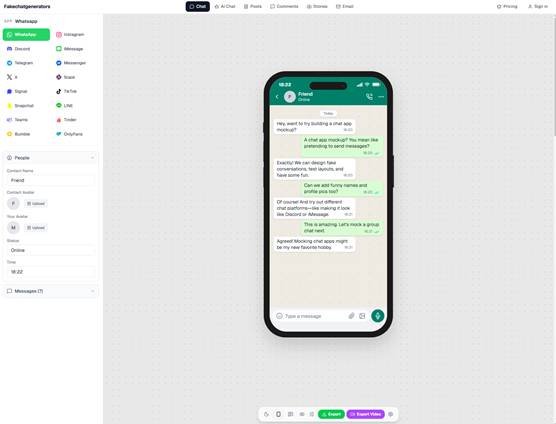
fakechatgenerators.com lets you mock up chat screenshots across 16 platforms
This is why digital literacy needs to focus less on “spot the tell” and more on process: What would you need to know before you treat this as evidence?
A classroom shift: from “Is it fake?” to “What would make it trustworthy?”
Students often want a single, clean answer. Real life rarely offers it. A better question is: what would make this screenshot trustworthy enough to act on?
That reframes the task into something teachable:
- What is the claim being made?
- What is the source and how did it reach you?
- What additional context would you request?
- What would count as confirmation, and what would count as a red flag?
This approach also reduces shame. If the lesson is “Don’t be gullible,” students who have been tricked will go quiet. If the lesson is “Here’s a method,” they’ll participate.
Three realistic teaching scenarios (with discussion prompts)
Below are three scenarios that work well in middle school, high school, and even teacher training. They don’t require students to create fakes themselves. You can present them as anonymized examples, or as teacher-made mockups clearly labeled for class use.
Scenario 1: The “confession” screenshot
A screenshot circulates showing a student “admitting” they cheated, said something racist, or planned to fight someone after school. The screenshot is forwarded by a friend of a friend. The message thread shows only a few lines, cropped tight.
Prompts:
- What’s missing from this screenshot that you would want to see?
- Who benefits from you believing it right now?
- If you were the accused student, what would you ask for to defend yourself?
- What’s an appropriate first step that does not escalate harm?
Skills practiced: recognizing cropping as persuasion, understanding motive, and choosing a de-escalation step.
Scenario 2: The “adult in DMs” safety report
A student reports that an adult is messaging them. They show a screenshot. The stakes are high, and you do not want to dismiss a report. At the same time, you need a responsible process.
Prompts:
- What immediate safety steps come first, regardless of the screenshot’s authenticity?
- What should be documented, and how?
- What should never be handled privately by a single staff member?
- How do you protect the reporting student while avoiding an accusation you cannot support?
Skills practiced: trauma-informed response, documentation, and understanding that verification and care can happen together.
Scenario 3: The “edited meaning” chat
The screenshot is real, but the meaning is distorted. A student shares a snippet that makes it look like someone agreed to something, but earlier messages show they were joking, or refusing, or responding to a different topic.
Prompts:
- How can true screenshots still be misleading?
- How does removing context change interpretation?
- What’s the difference between evidence and proof?
- When is it ethical to share a screenshot of someone else’s messages?
Skills practiced: context evaluation, inference, and digital ethics.
Practical verification habits students can actually use
You don’t need to turn students into forensic analysts. You do need to give them routines that work on a busy day.
- Ask for the “wider view.” Not just “show me more,” but “show the top of the conversation, contact info, and time context.” Cropping is a common way to steer interpretation.
- Request a screen recording when appropriate. A quick scroll through the thread can reveal continuity, timestamps, and message order. (This still isn’t perfect, but it raises the bar.)
- Check for platform mismatch. Students who use an app daily notice subtle UI differences, but they don’t always trust that instinct. Teach them to name what feels off: icon placement, font weight, bubble spacing, timestamp style.
- Consider the chain of custody. Who took the screenshot? Who edited it? How many times was it re-shared? Evidence degrades socially even when pixels stay sharp.
- Separate “need to know” from “need to share.” A screenshot can be shown to a trusted adult for help without being posted, forwarded, or used as entertainment.
Bringing detection tools into a lesson without overselling them
Detection tools can be useful, but they should be taught as one signal, not the final verdict. That’s a good life lesson in itself.
For example, an ai image detector may flag AI-generated media, document tampering, or unsafe content. It also claims 98.7% detection accuracy across 50+ generative models, with sub-150ms latency. Those are strong numbers, and it’s easy to see why journalists and trust and safety teams use tools like this.
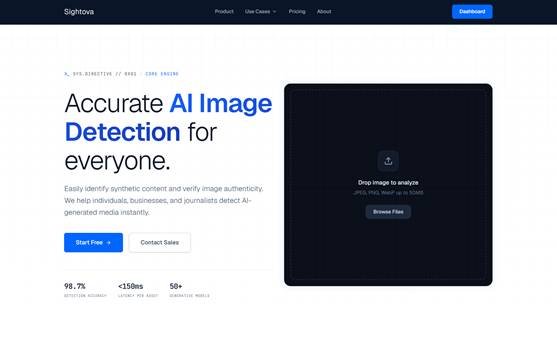
sightova.com flags AI-generated, tampered, NSFW, and violent imagery in milliseconds
In class, the key is how you frame it:
- A detector can support a decision, it should not replace judgment.
- False positives and false negatives are possible, so you still need context.
- Even if an image is “real,” it can be used misleadingly. Even if it’s “fake,” the harm it causes can be very real.
A helpful activity is to compare three items: a genuine screenshot, a teacher-made mock chat, and an intentionally misleading crop of a genuine chat. Then ask students which one feels most convincing and why. Many will be surprised by their own answers.
The ethics piece: “Can” is not the same as “should”
If students leave your classroom thinking, “I know how to make a fake screenshot,” that’s not digital literacy. That’s a new problem.
Ethics needs to be woven into the skill-building, not bolted on at the end. Try questions like:
- If you could fabricate proof of anything, what would happen to trust in your friend group?
- What does consent look like when sharing private messages?
- When does “exposing” turn into harassment?
- What are the real consequences at school, at home, and online?
Keep it grounded. Talk about what students already know: how quickly screenshots spread, how hard it is to correct a rumor, how “just delete it” rarely works.
A simple classroom norm that helps
One of the best norms you can teach is a pause rule: No big decisions based on one screenshot. Not “never believe screenshots,” but “slow down.”
Students can memorize that. Adults can model it. And it creates breathing room for better choices, whether the situation involves bullying, safety concerns, or a misunderstanding that could have been resolved in ten minutes.
Digital literacy is not only about detecting fakes. It’s about protecting relationships, reducing harm, and staying steady when something provocative lands in your hand. A realistic fake chat example, handled carefully, gives students a rehearsal for the moment it inevitably happens for real.